They provide a speedy, accurate and personal service. I am very impressed with the knowledge and the results achieved.
Mandi Cooper, FastBuy Properties
Results Focused
We've recently started using Big Surf for PPC and have been hugely impressed with the amount of research, knowledge, and time that's been invested in creating our campaign.
Caledonian Driver Training
Wealth of Knowledge
Calum at Big Surf Digital was available at short notice to deliver a comprehensive training session on SEO. We wouldn't hesitate in recommending his services.
H. Miller
Skilled and Professional
I needed some advice on marketing my website through google ads and Calum put me in the picture. He gave me loads of his time, even though he is obviously a very busy man. He is skilled and professional at what he does.
Stuart, The Academy of Professional Celebrants
Highly Recommend
Since Big Surf Digital have optimised my site, my rankings have increased considerably for my keywords and are continuing to do so. The impact on my business has been noticeable. I would have absolutely no hesitation in recommending them to prospective clients.
Rachael Roberts
How to increase website traffic and sales
More traffic from Google is something that can benefit any business. Increasing traffic from Google is something that's possible for anyone to do, but it takes the right advice and a lot of work.
How to get traffic to your website is a question that comes with a lot of answers. We boost traffic for clients through SEO and PPC. If you're looking to do this yourself though
this article will walk you through some of the processes we use.
To increase traffic from Google you first need the basics.
I am often asked how do you increase website traffic? The answer I often give is content, lots of content.
A functional website is the first thing you need. If you don't have one yet that's fine. It's not hard to set up. You can create a WordPress site fairly easily by buying a domain name and signing up
for a hosting account.
If you already have a site, great. It should be able to load pages quickly and display content without presenting lots of ads. That's about all your website needs. For the content you're going to create you
could either have a blog section on your site or you could be creating pages within your main navigation.
If you have a website that is well established in Google, has a good number of links and has been indexed for years your content will be able to rank quicker and higher than newer less established sites.
Websites with good domain strength that are trusted by Google will be able to publish new content and have it indexed and ranked highly in the same day. Think the Daily Mail or Guardian websites.
If you're just starting out with your site or it has a low number of links you can still move the needle. Increasing website traffic and sales is possible with any site. All it takes is a hell of a lot of work.
Google's helpful content update
Staying on the right side of Google's algorithm.
In 2022 Google released an update to how it computes search results called the Helpful Content Update. This is part of Google's ongoing battle with web spam and is just one more addition among many of Google's continuing updates.
In a nutshell this update penalises websites that aim to create content only for ranking purposes that don't supply anything useful or meaningful to users. You can imagine that with how profitable
Google traffic can be there is a lot of websites firing out garbage content just in order to rank. Google's business model revolves around getting people to the content or product that the user asks for. The
more helpful the search results are to users the more people will come back and search, and click on ads of course.
If a site is affected by this update its content won't rank as well as before. The only thing
you have to do to stay on the right side of it is to create useful, well researched, inspired, grammatically correct content. It's not rocket science but it's also not easy peasy.
Google and E-E-A-T
Google's advice for preparing content.
Google are never shy in telling website owners and marketers what they should be doing with their content.
E-E-A-T stands for experience, expertise, authoritativeness and trustworthiness. If you can display all of these attributes with your content then you're on the way to getting more traffic.
Achieving it in real life isn't quick and easy but it's a good guide to have when planning and reviewing your content. If you have extensive experience in a field then lay it all out in your writing. If you
don't then you're going to need to do some in-depth research into the subject.
My advice for writing for Google is to write about what you know and try and write from the perspective of telling someone everything they might need to know about a subject. Think about why the
reader wound up at your site. Are they trying to solve a problem? Are they wanting to read to be entertained or are they looking for a service that you do that they don't quite understand? Once you have
a user reading your words you can do a lot to entertain, convince, educate and sell to them with simple text.
Trustworthiness is something that can instantly be helped with an author profile that shows who has written the content and provides information on who the person is as well as some of their qualifications and experience. An author profile
can include links to Linkedin or social media pages, information on qualifications and or professional body memberships. The overall aim with this is to provide some reassurance to readers of your site about the writer so they can
better trust the content. See my example here and at the top of the page.
Different types of content
Content comes in many forms.
Content online can come in the form of text, image, video, feeds or comments and forums. For the purpose of this article we're going to be talking about web pages, primarily text on web pages.
Text based pages can then be broken down into categories. A few examples are:
Recipes, long-form articles, case studies, ecommerce product and category pages, white papers, checklists, guides and courses.
The type of content you will need to create will differ depending on the keywords or subject you are looking to target. The end goal doesn't change though whatever the content form is. It needs to be
comprehensive enough to answer the users question or inform, educate or entertain. In some cases it will also have to be of a sufficient content length to be able to rank well.
User intent
What does the user want?
Increasing website traffic and sales is all about user intent. Before you start writing content you need to know what your target audience wants from it. The keywords you choose will help you with this but in short you need to serve a need. That need can be anything from
someone wanting to know how to change the battery in their car keys to someone looking to produce a business plan for a new venture. At this stage do a lot of searching online to see if your content idea
has been done. It has, probably. Read the top sites in Google for the different searches to see what kind of information they're presenting. Equally important though is to see what other types of searches come up in the search bar when
you type in a query. Google also lists commonly asked questions. Rifle through these to either confirm that your idea is a good one or to find variants of it that haven't been addressed fully.
For really effective content that converts clicks into sales you need to generate content that serves a commercial purpose. If the keyword you've identified is 'buy gas barbecue' you could create a
piece of content called 'All of the great recipes I've cooked this summer'. It could go into detail on researching a gas barbecue, buying it, setting it up and maintaining it and then could go into enormous
detail on every meal cooked on it. This could be hugely useful and entertaining for someone that wants to start barbecuing more but lacks the confidence or experience. This content could work for the
barbecue manufacturer or someone looking to boost traffic for recipes. The important thing is that it is done well, with comprehensive accurate insightful content.
AI Content
Should you use it or not?
AI is a useful tool as long as you don't get it to do all the work. The types of articles that AI sites like ChatGPT spit out are rarely if ever good enough
to publish without some serious editing. LLMs create facts out of nowhere on some occasions and if you question them they will often give you a completely contrary
opinion to what they just said was a fact. However, if you're willing to put the work into editing the content it's possible to produce something worthwhile. By giving
LLMs very specific instructions it's possible to speed up the time taken to come up with ideas for articles, put together fast comprehensive outlines and write sections
of content.
Google are okay with people using AI to create content as long as the end results are good. And why wouldn't they be, they're using it on their end to create content
for their AI Overviews.
Keyword research
Find the right keywords for your content.
When researching keywords the objective is to find ones that have enough search demand to justify creating the content. You can create a lot of content around a particular topic and still not
rank well for it. Researching keywords before writing the content will ensure that you firm up on what the searcher is looking for, and optimise the content around specific questions. This can help
enormously as you will be able to see the content required from the user's perspective.
To find keyword data go to Google's keyword planner tool. It will show you monthly search amounts for specific countries
and cost per click data which can come in handy later. Take a note of all of the suitable keywords you're going to target as well as the cost per click range of each.
Use Google's search results to conduct keyword research too. Look at which common search terms appear in site's title tags (the clickable blue links in search results) and page headings and expand your
list for keywords with multiple variations. Aim for around 10 to 20 keywords that are all closely related to your content idea. Target a few really large terms and make the rest smaller variations.
The keyword research phase is also useful for identifying keyword variations that can show you what extra sections of content you might need to add. For example, if you are creating an article targeting guitar effect pedals
you may have created a post with the title 'How to use effect pedals to recreate Hendrix's tone'. Within this article you'll have sections about fuzz pedals and wah pedals but your keyword research may present the idea
of adding sections on the right sort of pedal chain or amp required to achieve the sound.
Content ideas
Coming up with ideas for content can be easy enough. There are tons of websites and search results that can lead you down a dizzying array of subjects. Within each subject are multiple strands that can
lead off in different directions. When going through content and researching what's already out there note down sections that interest you or that you think would be essential to include. If you come up with a content idea that is unique or has a unique slant to it you may have an edge over the current top ranking content for that idea. However, if your
idea has been done many times before you're going to need to look at the top ranking pages and figure out how you can do better. That may mean making the content more comprehensive and going into thorough
detail on parts that were only glossed over in other articles. Or it could mean combining your idea with another, like 'how to get close to Hendrix's guitar tone for £300' which would target the same subject I mentioned
earlier but now refined for guitar players on a budget.
When increasing website traffic and sales what you are trying to find is ideas for in-depth and interesting content that will also have some sort of sales slant to it. An example of an idea for this site would be 'How to create Analytics reports'.
People searching for related keywords could potentially be business owners or marketing managers. With this kind of article I could also
promote my own report creating service or SEO services at the end of the page.
One useful tip I'd like to offer is keep editing, don't just jump into an idea. Keep refining your ideas until they represent the type of content that you would want to read, or that you can imagine your
target user wanting or needing to read.
Create content
Knuckle down and do the work.
As anyone who took ages to do essays in school knows, it can be a slog to write about something you're not interested in. It can be a lot of fun if you are interested in something though, especially if you have deep knowledge of a
subject. Sharing your experience and knowledge can be a very enjoyable experience. There are ways to make things flow a bit easier though and one of these ways is to create a structure first.
Plan out the broad sections that your article will contain. Look at the notes you made when researching the content online and make sure you address each point. Once you have your list of paragraphs or sections
go back and edit. See how your planned content would stack up to the competition. Review your content plan and see if it can accommodate answers or in-depth analysis of the answers your keywords require. If
you're the kind of person who gets easily distracted just right out the first couple of lines of each paragraph and come back to finish them later. This can help move things along and provide a feeling
of progress which can keep you going. I highly recommend writing it in big batches. Write diligently for a couple of hours but don't try to do it all in one go.
If you have extensive knowledge of a subject then figure out how you want to get that across to the reader. There may be information that you know that you choose not to share because the reader doesn't
need to know about it. Remember what the initial intent is and what the user is getting out of the content at all times. Include anecdotes and real life examples if you have them. In order to rank well
you want to communicate your experience and knowledge to the reader which according to Google will transfer into good rankings and traffic.
Optimise content
Optimise to rank in Google.
Once your content is created go back through it and see if you can include your target keywords throughout the page. Put your big keyword in your Meta Title Tag and work it into your main (H1) heading. Try and include
your other keywords throughout the page as H2 and H3 headings and within the paragraphs. Aim to include two to three instances of each keyword within the page.
Don't worry about keyword density or a specific number of keywords in each paragraph or within the headings. There is no magic number of keywords to include. Make the URL of the page the name of the article with each word separated by a hyphen.
When it comes to on-page SEO it's good to have your target keywords within the content once or twice. Depending on the content it may be natural to include your keyword a lot more than that. It is possible
to over optimise a keyword by having it included too many times but if you just write the content without thinking about keywords you should stay on the right side of the algorithm. Then go back and ensure the exact phrase is included once certainly, twice if it fits.
Links and references
Display trustworthiness and be useful.
Content that is useful will often link out to other pages. You'll find that when writing genuinely helpful content that linking out will come naturally. With YMYL terms especially it will be essential
to include links to other resources for the user. YMYL is what Google refers to as Your Money or Your Life search terms. These are search terms that deal with health, medicine, finance and legal issues.
Search results for these kinds of keywords can have a negative or positive effect on people's lives so the results are held to a higher standard.
References for your articles are a good idea. If you are talking about figures or stats then reference where they came from. If you want people to trust your site you have to present accurate content that
is well researched and referenced.
Publishing content
Read, review, edit and publish.
When you've finished your content it's not yet ready to publish. If you want to create a great page of content that will be ranked highly and read by thousands of people you need to read, review and edit before you publish.
It can be very easy to miss spelling mistakes when checking your own writing. Use a spell checker but also if possible get someone else to read over it to check for spelling and grammar issues.
Whatever you do don't just finish an article and press publish. Read it through from start to finish to make sure it reads well, is free of mistakes and is actually an interesting article to read. When creating a handful of articles
it's maybe possible to go back and spot errors in future but if you're writing tens or hundreds of pages then you're going to need to ensure that every piece of content is perfect before you move on. You don't want to end up in a situation
where you potentially have hundreds of pages with errors in them. That could tank your rankings before you even get started.
Compare your finished content to the top 3 results for your target keywords in Google. If yours isn't good enough or pales in comparison then look at what else you can add to fully and completely discuss the topic.
Get your content indexed
Submit your page to Google for crawling and indexing.
Once your content is ready you need to get it indexed by Google. This will allow it to appear in search results. Getting a page indexed is usually fairly easy but there are issues
that can arise. Read our guide to indexing here.
Research more keywords based on user data
Pull in live search data from Google Search Console.
At this point you should have at least one page indexed in Google and showing up in search results. Even if it's only within the top 100. The next step is to analyse real user
data to identify more keywords and judge search amounts more accurately.
Once a page is indexed it will be eligible to rank for a wide range of search terms. To check if it's indexed type in site:www.domain.com into Google, replacing domain with the URL on your site.
Once it's indexed wait a month and then log into Search Console. This will allow you to see what searches the page is showing up for. If you're new to Search Console
then read about it here.
Within Search Console you will be able to view search terms. Click on 'Performance' on the left hand side then 'Pages'. Scroll down the list of URLs until you find the one you're looking for then click into it.
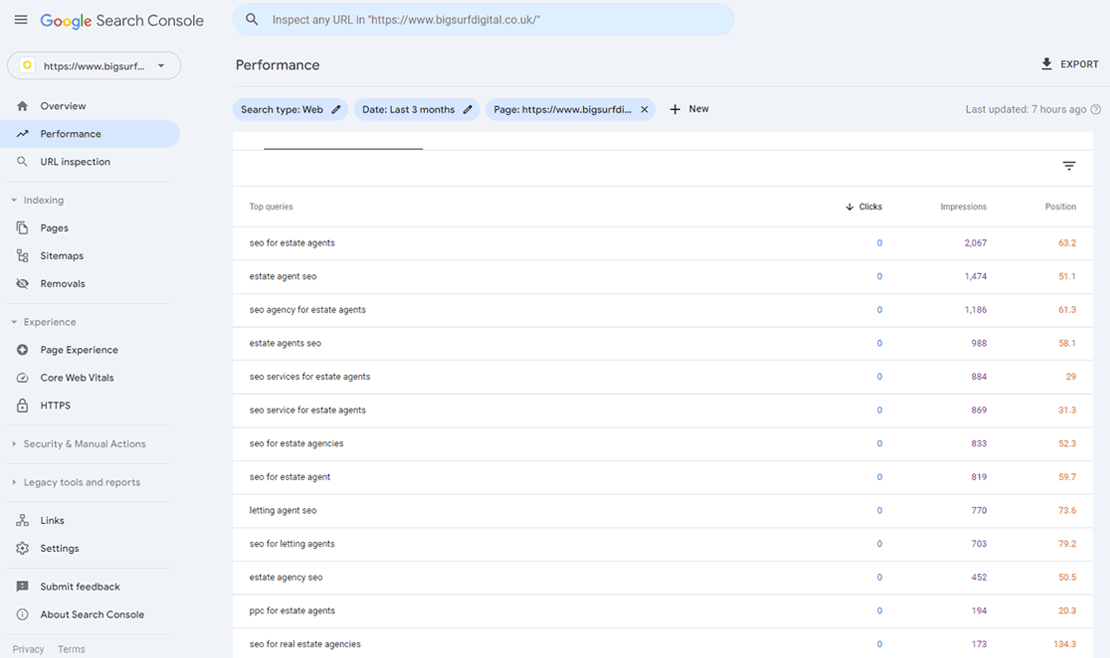
For an example we'll look at this page we've created for estate agents looking for SEO. This is a new page
so it's not bringing in any traffic yet. It is indexed though and the screenshot below shows the specific search terms that it ranks for.
As well as the list of keywords it also shows how many impressions there's been for each one within the selected timeframe and the average ranking position. So now we have a huge list of variations of
our initial keywords. Go through this data and create a list of keywords which the page is already showing within the top 50 for, ensuring that you include some that are as close to page one as possible.
Now rewrite parts of the content to accommodate these new keyword variations. Or if there is nowhere suitable add new sections. Once you have done this ensure each new keyword is within your content at least once. Check it for errors
then submit the page to Google for re-indexing. Give it a couple of weeks and check your rankings to see if there are any improvements.
In the example above I would select the following keywords as they have a lot of impressions and they're long-tail enough to possibly not be as competitive as others:
SEO services for estate agents
SEO agency for estate agents
PPC for estate agents
estate agent PPC
Carry out this process on every page of content that you publish.
Evergreen content
Keep content up to date.
Providing content that's up to date and accurate is useful for your readers and Google's users. Adding content that is going to be out of date soon is not a great way of bringing in traffic. You will
constantly need to be on top of updating it so it's relevant to your users. Evergreen content on the other hand is content that never goes out of date. It's better to go for this type of content as it
will need less work to maintain. Try to write without mentioning specific timeframes or references to things occurring at the time such as politics or 'cost of living' or the seasons.
There will also be times when despite your best efforts something changes and you need to review and edit content. It's a good idea to start up a spreadsheet to list all of your
sites' content and when it was last checked. Even if this gets you going back to an article once a year to reread it that will help in ensuring its accuracy.
Get links to your content
Promote your articles.
One of the ways that Google evaluates the ranking position of a page is to look at how many links a page has plus how many links the website hosting it has. So long story short, if your
content has links to it from other sites then it will rank higher in search. How to get links is a subject that a lot has been written about, but try not to go too far down that rabbit hole.
Just try to get your article linked from a few relevant websites. If your website is listed on any local business listing sites see if you can add a link to your article on some of them. This is possible as I do it myself.
Getting links to your home page will help all of the pages within it so sign up for industry memberships, directories and submit press releases to appropriate sites when your business has any news, no matter how small. This
will contribute to boosting your sites link numbers which will boost its rankings as a whole.
Do everything listed so far x 50
Build up a library of expert content.
If you do everything listed so far you should be able to create a great article that brings in traffic. The next thing to do is another article, then keep going until you've got a site full of 50 large content pieces.
This could go some way to boosting traffic and making your site or business financially lucrative. There are other benefits too such as being able to direct one of your customers to an article
that can solve their problem without you having to. It's also a great way of showing off your expertise and can make you look like an expert in your field.
How to increase website sales 1: Conversions.
Install conversion tracking
Conversion tracking is essential if you want to increase sales from your website. A conversion on a website is most commonly a form being submitted or a sale going through. It
can be all sorts of things though. It's basically something that's important enough to track. In this case we want to track when someone visits your page of content and then proceeds to get in touch with you or buy what you're selling.
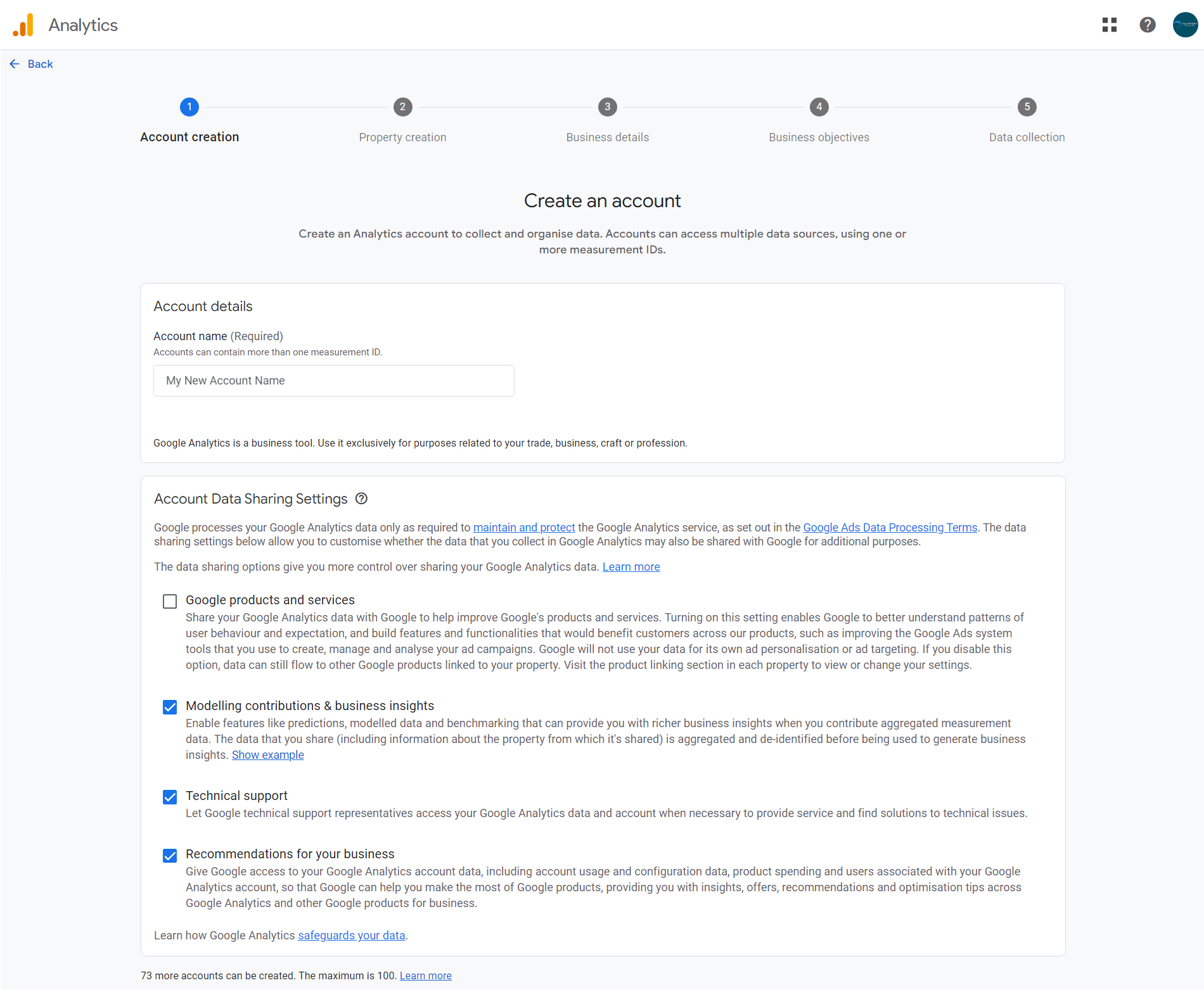
To do that you are going to need to install Google Analytics on your site. This is how you do it.
2. Create a web property. Untick all the Share Data with Google options. Select a category and other options, these aren't really important.
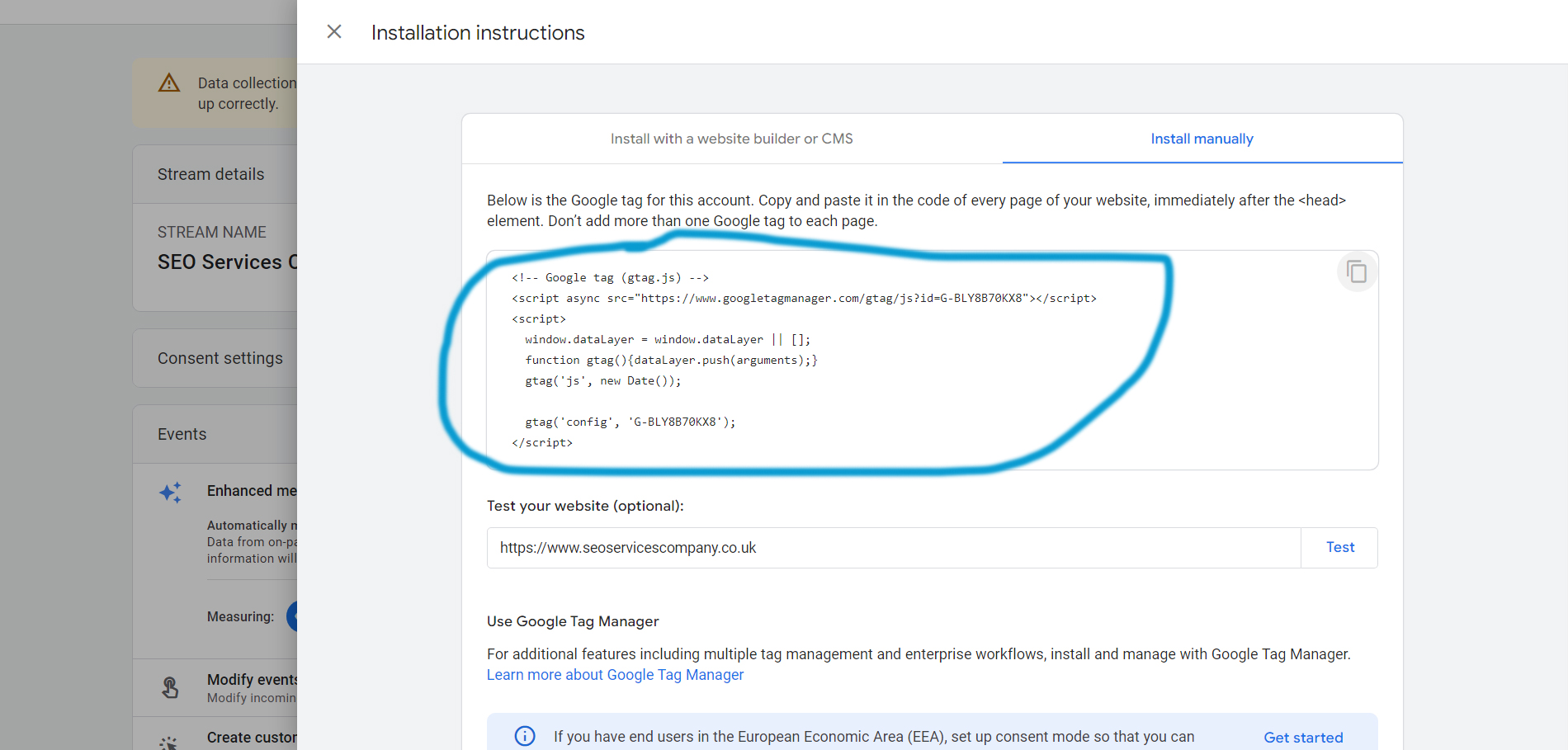
When you come to 'Start Collecting Data' select Web as your platform. Add in your URL and Name, including the WWW if your website has that, then proceed. Choose 'Install Manually' then copy the code you see on the page by clicking the icon in the top right of the frame. Then paste that code into a notepad file for safe keeping.
3. Copy the code into your website. The code needs to appear on every page with the head section of the code. If you are able to edit your HTML code you can just paste it into the header. If you are
using WordPress you can paste it into the header.php file by going to 'Appearance, Theme File Editor on the left hand side then clicking header.php on the right hand side.
Your WordPress theme may not allow this so you can also add the code using a plugin called 'Header Footer Code Manager'. Go to 'Add New Plugin' then search for 'Header Footer Code Manager' then install it.
Once installed you'll see HFCM on the left hand side. Click into it and select 'Add New'. Give your snippet a name, make sure 'Site Wide' is selected and 'Location' is set to 'Header'. Paste your Analytics
code into the 'Snippet / Code' section.
If you're having trouble with this fill in our contact form here and we'll set it up for you.
4. Add contact form conversions.
To add Conversions in Google Analytics you need to know about events. Events are actions that occur on your website that includes things like file downloads, page views and clicks on links. Conversions are known in Analytics as 'Key Events' but don't get
confused. Key Events are Conversions.
To set up a contact form conversion you will need your contact form to go to a Thank You page once submitted. This is fairly standard and most WordPress forms have this functionality.
Go to Analytics and select 'Admin' / small cog in the bottom left, Property settings / Data display / Key events. Click 'New Key Event'. Give it a name ensuring that it has underscores _ in place of spaces and click 'Save'. Your new conversion
should already be marked as a key event but you may need to click the button which says 'Mark as key event'.
5. Add checkout conversions.
Checkout conversions will be recorded whenever your site makes a sale. You can set up a conversion for sales like you did previously but you would replace the thank you page with the
final 'Thank you for your order' page.
A better option though is to set up Enhanced ecommerce tracking so that you can see the value of sales within Analytics. You can read about how to do that here.
How to increase website sales 2: Call to actions
Create call to action buttons and forms.
Your content should provide meaningful and useful information for your readers but you also want to include Call To Actions (CTA) on your pages for the services or products that you
offer. A CTA is what you add when you want a user to take action, normally a link to add to cart or to get in touch.
A Call To Action is all about telling users what to do to move things on. It's quite common to think of web users going through a website methodically and slowly, taking time to
think and read everything in front of them. I've watched a lot of mouse tracking and eye tracking videos of user journeys as well as reviewed a lot of user heat maps in my time.
How users really use sites is quickly and erratically. In many cases they dart from one thing to another taking only passing glances at the content. Although that's mainly from landing pages
that don't have a lot of content. Users will read if the page is formatted correctly.
With users generally in a hurry and not paying much attention to the content a Call To Action can help cut through any confusion and instruct the user what to do next.
Now that you have your content published and bringing in some traffic from organic clicks it's time to increase traffic further with some ads. There are a lot of different ad sources online
but we're going to look at one of the biggest, Google Ads. With Google Ads you can create a campaign and display ads in Google search results whenever your target keywords are
searched.
Setting up Google Ads.
I could write a book about Google Ads as it's that complicated. However, you can produce great results by only focusing on the following streamlined strategy.
Streamlined Google Ads Strategy.
Google Ads account creation
Account settings
Conversion set up
Campaign, ad group, keywords set up
Creating ad copy and ad variations
Daily monitoring and negative keywords
Cutting the fat, Google's recommendations
Google Ads account creation.
Visit Google Ads and create an account. If you don't have a Gmail address you'll have to create one. Avoid the 'Start with an expert' option.
There are two versions. Smart Mode and Expert Mode. Smart mode is deceptive as this is the version which will limit your options for settings during set up and limit the amount of
data you'll be able to see. Expert Mode will allow you to do everything you need to.
Account settings
There's a lot settings to choose from when setting up a campaign. Here's the most important ones to do and not to do.
Under Networks opt out of 'Search Network' and 'Display Network'. You'll see this option when setting up a campaign. If you need to find this setting again once the
campaign is set up you'll need to click the cog beside the name of each campaign.
Under Locations you can choose which places to target and exclude. After that click on 'Location Options' and select 'Presence: People in or regularly in your targeted locations'.
There are a number of ways that you can set how much you want to bid for clicks. This is under 'Bidding'.
Some of the most common strategies are: Manual CPC
Max Clicks
Max Conversions
I recommend you use Manual CPC to start with so that you have full control of setting your own bids. Once your ads are doing well and bringing in conversions try switching to Max
Conversions as it can help to automate bidding and enhance the chances of getting more conversions. Make sure 'Broad Keywords' is set to 'Off'.
Campaign, ad group, keywords set up.
The format of Google ads is an ad within an ad group within a campaign.
Campaign / Ad Group / Ads
You can have one campaign that targets multiple areas or multiple campaigns for different areas. Start out with one main campaign and then create an ad group for each group of keywords that
you've researched. Grouping keywords together will probably seem quite natural but if in doubt group them by keyword similarity and user intent.
When setting up keywords you can opt for either Exact Match, Phrase Match or Broad Match. At the start of your campaign opt for Exact Match. This will ensure that the search terms your ads
show for are closely related to your keywords.
You may be wondering how a search query is different to a keyword in Google Ads. A search query is what the user actually types into the search engine. The keyword is what you are using
to guide Google in what words you want your ads to show for. Think of keywords as a group of closely related search queries because although you specify the keyword
'guitar pedals' Google will show your ads when someone types in search terms including 'buy guitar pedals' 'best guitar pedals' and a whole slew of others.
Changing the match type to Phrase or Broad increases the amount of queries the ads will show for. This can be a good thing as it increases the reach of keywords but it will also massively
increase the number of unrelated queries that will never convert into sales.
Creating ad copy and ad variations.
Create ads based around the selling points of your products or services. Focus on the points that you think your customer would want to know. You can add multiple headings and descriptions but
I recommend adding three headings and two descriptions. You don't need any more if you write these well enough.
Daily monitoring and negative keywords.
You'll need to monitor your ads daily to see how they perform. Two important elements to keep on top of are 'Search terms' and Click Through Rate (CTR). Make sure your CTR is above
5%. If not you may need to raise your bids.
Negative keywords are keywords that you can add to your campaign to block your ads showing up for particular searches. Go into the 'Search Terms' report under 'Insights and reports'. Here you'll see the search terms that have brought in clicks. Add any that you don't think are suitable as
negative keywords. You can either add the whole search term by ticking it and selecting 'Add as negative keyword' or you can add part of a negative keyword to block out particular terms.
To add to your negative keyword list go to 'Audiences, keywords and content' then 'Search Keywords'. Then you'll see a tab for 'Negative Search Keywords'.
Some useful negative keywords to start with are:
jobs, apply, cv, how, where, when, what, who, why, is are, the.
Cutting the fat, Google's recommendations.
The goal of your Google Ads campaign should be to refine it until it is bringing in sales or enquiries at a reasonable cost. The best way to do that is to put together a strong keyword list that you know
your customers will be searching for. Also trial a number of different ads and landing pages with different sales text. Get some clicks for all of these and see what works and what doesn't. Allow
your keywords and ads a good amount of clicks before turning any off.
If you have ads running to a couple of landing pages at the same time you need to know about statistical significance.
Ideally you need to reach statistical significance before you can be sure that one ad is better than the other.
The best advice I can give you for working with Google Ads is this.
Refine and cut away as much as possible to try and get to the keywords, ad copy and landing pages that actually produce
results. If you haven't heard of the 80/20 rule then I'd recommend reading about it. The gist of it is that 80 percent of the results come from 20% of the work. It's a phenomenon
that occurs in nature and in business. (The above link is not an affiliate by the way.) The theory goes that by eliminating the 80% that isn't working as well and finding and focusing on the 20% you'll be able to
see huge improvements. This goes against how Google Ads works today. That system is weighted to show your ads for as many different keywords as possible and to reach as many different kinds of people
as possible so that their algorithm or AI can figure out what converts and hone in on that.
I'd recommend against letting Google's AI do that for you as it can run through a lot of ad spend to get it right. Instead attempt to hone in on the most impactful keywords yourself by sticking with exact match keywords, pinned ads and manual bidding. Once you have identified the
important keywords by looking in your search terms reports then it can be beneficial to use some of the AI based bidding strategies.
Also, when running a campaign you will see constant advice within the ads platform from Google about what changes you should make next. You should ignore 99% of this advice as it will
be pushing you to spend more money regardless of results.
How to increase website sales 4: Heatmaps.
Refine your content with user heatmaps.
A heatmap gives you a way to see which content is more popular by highlighting user activity. There are some good tools out there which can allow you to create heatmaps of any page.
Run a heatmap over a long enough time frame and you will be able to see which parts of your content is the most popular. This can help you identify some of the things that are most important
to your users or what types of content structure performs best. I use Crazy Egg for heatmaps. A paid account will also allow you to do A/B testing but it's quite expensive for what it is.
You can read a bit more about using heatmaps here.
Looking to increase traffic? Here's what's to avoid.
Pitfalls that are easy to succumb to.
There's one major thing that you can avoid if you want to increase traffic and that's the website re-design. Should you improve your website? Yes. But don't remove what you've already built
and start from scratch. I've worked with a lot of sites that started off with no traffic. Out of the sites that went on to do well none of them opted for a website re-design. There's usually far more that needs to be done before you
need to think about re-designing. If you have a website that has a standard design and loads quickly then that's really all you need. Creating content, working on SEO, running ads and
refining your sales messages is what's going to make the biggest difference in boosting traffic.
Get a quote for SEO, PPC or CRO.
If you don't have the time or aren't interested in doing any of this yourself then get in touch for a quote. We can provide SEO, PPC or CRO campaigns which deal with everything mentioned
in this article, with regular reports to show you how your sites performing.
Check out some of our results
SEO campaign for online retailer - Increased revenue by 133%
PPC campaign for property company - Increased leads by 31%
SEO campaign for US Gear manufacturer - Increased enquiries by 94%
PPC campaign for driving School - Increased enquiries by 633%