They provide a speedy, accurate and personal service. I am very impressed with the knowledge and the results achieved.
Mandi Cooper, FastBuy Properties
Results Focused
We've recently started using Big Surf for PPC and have been hugely impressed with the amount of research, knowledge, and time that's been invested in creating our campaign.
Caledonian Driver Training
Wealth of Knowledge
Calum at Big Surf Digital was available at short notice to deliver a comprehensive training session on SEO. We wouldn't hesitate in recommending his services.
H. Miller
Skilled and Professional
I needed some advice on marketing my website through google ads and Calum put me in the picture. He gave me loads of his time, even though he is obviously a very busy man. He is skilled and professional at what he does.
Stuart, The Academy of Professional Celebrants
Highly Recommend
Since Big Surf Digital have optimised my site, my rankings have increased considerably for my keywords and are continuing to do so. The impact on my business has been noticeable. I would have absolutely no hesitation in recommending them to prospective clients.
Rachael Roberts
How to stop wasting money on Google Ads
Google Ads can be a good source of enquiries and sales but it can also be a money pit. Here are some strategies and tricks to avoid wasting your budget.
When Google Ads was first introduced it was an incredibly effective way of getting new business. The premise was simple. Bid to have your ad shown when a user types in a specific keyword.
If your ad gets a click you get charged for it. By choosing specific keywords it was possible to attract the right kind of customer at the right time. While that is still the general idea behind
how Google Ads works today the reality is somewhat different. The cost for clicks has increased while the effectiveness of those clicks has dropped. This is mostly down to Google changing how match types work.
A match type is what you use in your ads account to tell Google what kind of search terms you want your ad to show for. There are three main match types, exact match, phrase match and broad match. An exact match
used to mean that when you added a keyword as an exact match your ads would show whenever that exact keyword was searched for. So if you added the keyword [red fridge] your ads would show when a user searched for
"red fridge", or for misspellings, plural versions or very very similar terms occasionally. Phrase match meant that the keyword "red fridge" would trigger ads for searches like "I want to buy a red fridge". Broad match would show ads
for search terms loosely related to the term. Exact was tight control, phrase was looser and broad was looser still.
However all that changed. Exact now functions a lot like parts of the old phrase and broad put together. Exact, phrase and broad will all show your ads for such a wide variety of search terms that they take a lot
of work to keep weeding out all the non converting terms.
Whereas it was once possible to target a single keyword easily by adding it as an exact match, a single keyword today will trigger potentially hundreds of
different close variants. To get only clicks from a specific keyword like [SEO Company] would require adding constant negative keywords to exclude those other
terms.
From a money making point of view I can sort of see why Google would do this. By identifying which keywords bring in sales and which don't advertisers can then hone in on the ones that get results and pause all the rest. This reduces the number of keywords that Google
can then generate ad click costs for. It would be frustrating from Google's end seeing advertisers only bidding on a small portion of the available search terms. From a simplistic point of view why wouldn't Google want advertisers to be
bidding on their whole search term inventory.
That way of thinking causes huge issues for advertisers though and ends up making the Google Ads system far less effective. There is a big difference between getting 10 clicks for 'seo agency' and 10 clicks for 'seo consultant'. One is more likely to be traffic from
companies looking for an established agency, with a bigger budget to spend. The other is likely looking for an SEO consultant, a single person, so potentially a lower available budget. Google Ads will treat these
2 search terms the same though. I've seen this happen in the Big Surf Digital Google Ads account.
Often what now ends up happening is that new advertisers try out Google Ads, lose lots of money and can't make their ads cost effective. Unless you know the tricks to stop the campaign spending on the wrong kinds of search terms it can be incredibly difficult to make it work.
It takes a lot longer than it used to to make an account cost effective. That means having to convince clients to stick with it which can be difficult if they're constantly paying out and not seeing returns.
How to stop wasted spend
Find what works, remove what doesn't.
When it comes to the problem of how to stop wasting money on Google Ads the solution is all about what constitutes good spend and what is wasted spend.
Ad spend is good as long it is producing results. Ad spend that just gets you clicks without conversions is what we call wasted spend. To create a high ROI
campaign it's important to discover what's working and what's not.
Correct conversion tracking
Conversion tracking is essential if you want to make a campaign perform well. It's most definitely not an optional add on. For smaller clients I've worked with it's fairly common
for them to not have conversion tracking set up when they first hire me. This is always the first thing I get added. Unfortunately every day you run ads without proper tracking is a waste of money
in the grand scheme of things. You might get some sales or leads but the real value is the click data. You can use the data that comes in to mould your campaign into a high performing account. Without it you're flying blind.
Read about how to install conversions in Google Analytics.
Once conversions are being tracked it becomes possible to review the search terms report and add negative keywords.
Negative keywords
Now that you've got conversion tracking in place you can move on to negative keywords. How to save money on Google Ads? That's a question without a quick answer but
if I had to shorten it as much as possible I would say that all you need is accurate conversion tracking and negative keywords.
Negative keywords are the last line of defence in protecting how your budget is spent. By identifying search terms that are either off topic or don't convert, you can then
add these to the campaign as negative keywords so you will no longer see any traffic for these terms. The problem comes with Google's close variants. For each keyword you add Google will show your ads
for a ton of what it calls close variants. However, these are usually not close nor variants. Adding negative keywords is an ongoing process. It can be demoralising when you've added hundreds of negatives only
to then find hundreds more random search terms in the account but keep with it. It will make a difference over time. Try to add the actual term that triggered an ad but where possible add the root term in the phrase to
block out further closely related terms.
Boosting conversion rates
There's work to be done in getting the right kind of clicks from your campaign. Once that's achieved and you've got enough data in to be actionable you can start to
judge how well your landing pages are doing. Are they converting enough of your clicks into leads or sales. If not it's time to edit your landing pages to convince your customers to buy what
you're selling. When it comes to saving money on Google Ads this can be a game changer.
Where do I start with recommendations in Google Ads? Wouldn't it be great if Google would let us know how we should optimise our campaigns and how we can make them more cost effective.
The Recommendations tab in Google Ads is not that. If you want to ensure your account blindly follows best practices (set by Google) that will increase ad spend regardless of conversion levels then go ahead.
If you're concerned about getting more conversions at a good cost per conversion then ignore all the recommendations, and phone calls from Google reps while you're at it. These recommendations won't help you reduce Google Ads waste.
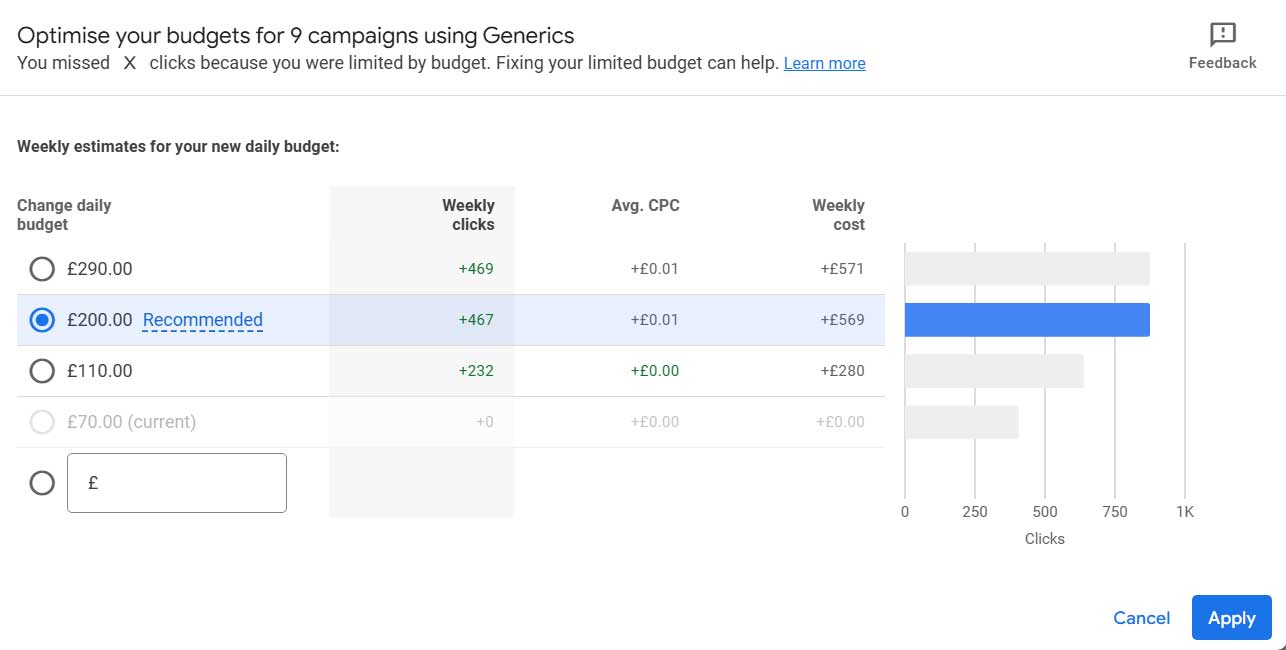
A recommendation that I find quite funny is the 'Limited By Budget' warning that pops up in the campaign. When you click on it the message says 'You missed X clicks because you were limited by budget. Fixing your limited budget can help'.
Well of course you can get more clicks if you increase your budget, but isn't that the point of a budget, to limit how much you spend? The example below is wanting me to increase the budget by 185%.
Optimisation score
There's a score within your account which will go up or down based on how many of the recommendations you accept, but also how many of the features you use within the account. It's best to ignore this as having a 100%
score won't help you get cheaper clicks or more conversions. The campaign below has a very good conversion rate of 25% yet only gets an optimisation score of 54%.
The optimisation score is just an attempt by Google to push you to use particular options and strategies. Instead, focus on the click through rate, conversion rate and cost per click of your campaign.
The image below shows a great conversion rate and poor optimisation score. This score will not affect your performance.
More than once I've had clients come to me after they've ruined their previously good campaign performance by accepting Google's account recommendations. Give very careful consideration to accepting them, or just ignore them altogether.
Google reps
Google employs outside agencies who hire people as Google reps. These reps are given the target of getting Google Ads advertisers to enact their recommendations.
However, for the reasons listed above these recommendations may not be in your campaigns best interest so if you accept their invitation for a campaign review question the
changes they recommend making. In my experience advice form Google reps rarely helps to reduce Google Ads waste.
Give changes time
It's very easy to second guess your changes when running a campaign. You may be sure you've figured out a good strategy only to doubt it a few days later when
it produces no conversions. It's important to give changes enough time to show results. It's difficult to say how much time as different budgets will produce
massively different results but the longer you leave your changes the more sure you can be that an element of your strategy is or isn't going to work. Also, when using
automated bidding strategies the algorithm needs enough data and time to learn effectively.
Waiting until you have statistical significance may not always be necessary
but can be useful in certain situations.
Bidding strategies
In the old days there was just manual cost per click. These days there are many options including:
Maximise Clicks, Maximise Conversions, Maximise Conversion Value, Target Impression Share and Manual CPC. If you're trying to optimise Google Ads spend effectively you need to know the pros and cons of each bidding strategy.
The efficacy of each is up for debate. What works for one client may not work for another but here's the general gist of each and when to use them.
Manual CPC. This is a dependable bidding strategy without any bells and whistles. You get to decide the most you will pay for a click from each keyword. Combined
with research from Google's Keyword Planner you can research the average bid amounts and set your keyword bids accordingly. This strategy is fully manual so there's no
automated AI making decisions on how much you're spending. This is great to start a campaign with, especially if you are in a market with expensive clicks, not enough
of a budget, and not enough time to get results for a client. It seems that Google doesn't actually want people to use Manual CPC all that much and actively discourages it.
It's not available to choose when setting up a new campaign. You have to go in after the campaigns set up and then you'll see the option.
Maximise Clicks. This is an option when you need to get as many clicks as possible. It's possible to set an overall maximum click bid but not a specific bid for
each keyword. So you get less control but you also need to manage it less. When starting out a campaign with a low cost per click it can be useful to quickly see how much you need to
spend to get a good click through rate for each keyword. Once you have that info I would recommend switching to Manual CPC and lowering bids to see how low you can go while still getting clicks.
Max Conversions. This can be an excellent option when you have solid conversion tracking and enough conversion history recorded. In general if you have over 30 conversions in the last 4 weeks this
strategy could work well. Google Ads will try and push you to switch to as early as possible. Resist that advice and hold on until you've got enough data or it likely won't perform well.
Max Conversion Value / Target ROAS. This strategy focuses on getting the most revenue or value out of your budget rather than just the highest number of
conversions. It works best when your conversion values vary and you're tracking them accurately. You’ll need a good amount of conversion data,
ideally over 50 conversions with value data in the past 30 days, to give Google enough to optimise against. Set a realistic ROAS target based on historical data
rather than guesswork. If your goal is profitable growth rather than just volume, this can be a strong option.
Target Impression Share. This strategy is all about visibility. You can use it to show up in a certain percentage of auctions in specific positions
(like top of page or absolute top). It’s particularly useful for branded campaigns or when you absolutely need to dominate a search term. However, it doesn’t
factor in conversions or cost efficiency, so be careful not to let it run unchecked. Monitor your CPCs and budget closely, as this strategy can get expensive
quickly if you’re targeting aggressive impression share levels.
Important settings
Location targeting:
If you want to optimise Google Ads spend effectively there are a few easy wins to be had. Some of the most critical settings in Google Ads are buried deep in campaign setup and often skipped over. One of these is location targeting settings. By
default, Google includes people who show interest in your targeted location, not just people in it. This can lead to wasted spend on users outside the area you're
targeting. You can tighten this up by switching to “Presence: People in or regularly in your targeted locations” under location options. It’s a small change that
can drastically improve lead quality, especially for local businesses.
Ad rotation:
Another one to watch is ad rotation. While most campaigns default to letting Google optimise ad rotation automatically, if you're testing
different ad copy or landing pages you'll need to set it to “Do not optimise”. This ensures each ad gets a fair share of impressions and will let you gather
cleaner data.
Search and display network:
This is always a setting I untick. Opting into the search and display network means your ads will show on sites other than
Google, where Google has some ad space or search results displaying. Traffic from this converts very poorly so you'll be better off opting out.
Get in touch for a PPC quote
We provide Google Ads Campaigns for a range of different companies in the UK and the US. We work with small clients offering local services to multinationals and
manage over £40,000 in ad spend per month.
Check out some of our results
SEO campaign for online retailer - Increased revenue by 133%
PPC campaign for property company - Increased leads by 31%
SEO campaign for US Gear manufacturer - Increased enquiries by 94%
PPC campaign for driving School - Increased enquiries by 633%